Skip to content

Apple rejected over 2 million app submissions in 2025.

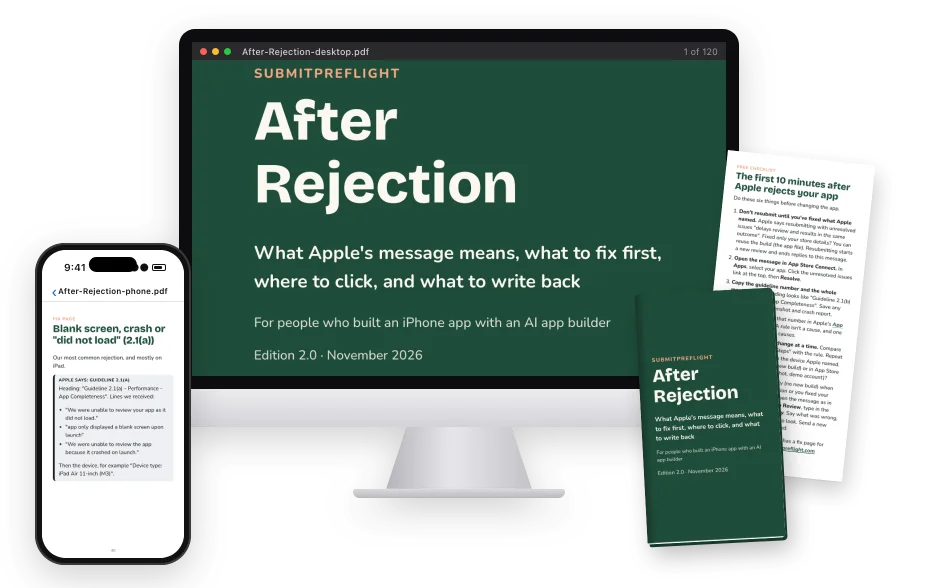
After Rejection on every screen: the desktop edition’s cover on a monitor, the blank-screen fix page of the phone edition on an iPhone, the phone edition’s cover and the printed one-page checklist.

AFTER REJECTION · A PDF GUIDE FOR AI-BUILT APPS

Built your app with Claude, Lovable or Base44? Check it before Apple does.

Built from about 20 of our own rejections across 8 apps · Checked against Apple’s rules on 9 November 2026

Instant PDF download Launch price $19 until 1 December, then $29. No subscription.

Not sending it yet? Free: 12 checks before you hit Publish (PDF)

This guide will help you:

  • Look up Apple’s message by guideline number or by a phrase from it, so that you fix the real cause, not just the rule Apple named.
  • Get the checks, the clicks and a prompt for your AI builder, so that your next build isn’t another guess.
  • Send Apple a clear reply, so that the reviewer sees what changed and in which build.
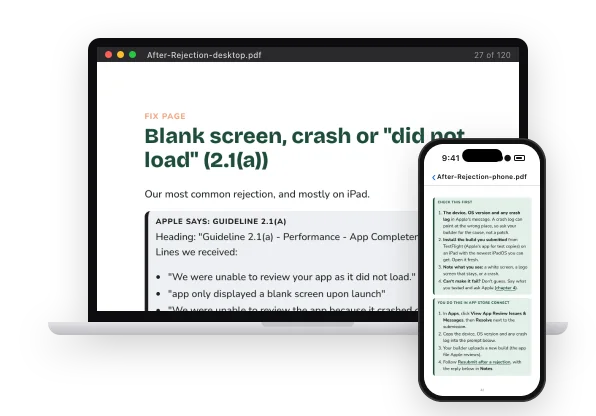
The blank-screen fix page in the desktop edition on a laptop, and its Check this first page in the phone edition on an iPhone.

Why we wrote this

Apple rejected our apps
about 20 times.
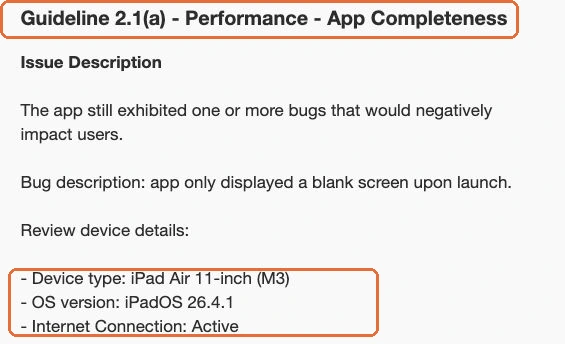
A real App Review message from one of our rejections. Guideline 2.1(a) - Performance - App Completeness. Bug description: app only displayed a blank screen upon launch. Device type: iPad Air 11-inch (M3), OS version: iPadOS 26.4.1.
One of our own rejections, as Apple sent it. The app name is hidden.

Between February and September 2026, Apple rejected our iPhone apps about 20 times, across 8 apps. Eight months of rejection messages.

Each message named a guideline and what the reviewer saw. Finding the cause was up to us.

So we guessed. One app was rejected three times before we found the cause, and each retry cost us five to seven days.

Guideline 2.1(a) - Performance - App Completeness
“We were unable to review your app as it did not load.”

A real message from our own rejections. Behind this one sentence we found four different faults.

When we finally laid all 13 patterns side by side, one thing stood out: 6 of the 13 had nothing to do with code. They were fixed in App Store Connect, on a web host or in an account setting.

So we wrote every cause down, checked each one against Apple’s current rules, and turned it into the guide we wish we’d had after the first rejection.

That guide is After Rejection.

  • 5–7 daysper retry, for one purchase problem of ours
  • 3 rejectionson one of our apps before we found the cause
  • Over 40%of unresolved issues relate to guideline 2.1, Apple says. 5 of the 18 fix pages cover it.

You are not alone: in 2025 App Review “evaluated more than 9.1 million app submissions” and “rejected over 2 million app submissions”, Apple says. Our numbers are our experience, not Apple’s averages. Apple’s figures: App Review status, App Review overview, Apple Newsroom, May 2026.

Instant PDF download

Who this is for

We wrote this
for four people.

  • You were just rejected and the guideline number means nothing to you. “Guideline 2.1(a) - Performance - App Completeness” tells you which rule. It doesn’t tell you what to change.
  • You’re about to submit your first app built with Rork, Lovable, Vibecode, Claude Code or ChatGPT, and you want to check the things that got our apps rejected before Apple finds them.
  • You’ve been rejected twice for the same guideline and you’re out of guesses. Apple says that if your app is “repeatedly rejected for the same guideline violation”, review takes longer.
  • You’re selling a subscription for the first time and the purchase has to go to review with the app. Apple changed how that works on 15 July 2026, and older guides still show the old way.

For people who built an iPhone app with an AI app builder, such as Rork, Vibecode, Lovable, Claude Code or ChatGPT, and were just rejected or are about to submit. No coding needed. Developers will find it useful too.

Instant PDF download

Why guessing is expensive

The slowest way
to get approved.

After a rejection, it is tempting to do one of these three things. Each one spends another review on a guess.

  1. Resubmit the same build and hope.

    Apple is blunt about this one. Resubmitting with unresolved issues “delays review and results in the same outcome”.

  2. Ask your AI builder to “fix the rejection”.

    It will change something, because code is all it can see. It can’t see App Store Connect, your web host or your account settings, and that is where 6 of our 13 patterns were fixed.

  3. Argue with the reviewer.

    A reply that disputes the rejection gives the reviewer nothing new to check. Apple’s own advice for that reply: “Be specific about what you’re asking”.

Apple’s goal is to review at least 50% of submissions in less than 24 hours and 90% in less than 48 hours. Every wrong guess puts you back in that line.

The better way

Go from Apple’s message to a plan in about 10 minutes, instead of spending another review cycle on a guess.

  1. You look up the guideline number or a phrase from the message and open the fix page that deals with it.
  2. You run a short list of checks in a set order, then paste a prompt that asks your builder for the cause, not just a patch.
  3. You follow the exact App Store Connect clicks and send Apple a reply that says which build fixes what.

Instant PDF download

After Rejection · Edition 2.0

Everything between
“rejected” and “resubmitted”.

One download, in plain English. Here is every part of it, and what each part does for you.

What you get:

  • The phone and desktop editions: About 22,000 words. The phone edition is 197 pages at 12 pt, with tappable links, sized to read beside App Store Connect. The desktop edition is 6 × 9 in, for a laptop or printing.

  • Chapter 1: How review works: The path your app takes, what each status means, how Apple writes its messages and how long review takes. Where Apple doesn’t say how something works, the guide says so.

  • Find your rejection: Look up Apple’s message by guideline number or by a phrase from it, and land on the fix page that deals with it. If yours isn’t listed, chapter 2 says what to do next.

  • 18 fix pages: Apple’s words, what they mean, what caused it for us where we had it, what to check first, the exact App Store Connect clicks, a prompt for your builder and a reply to Apple.

  • The AI edition: The whole guide as one text file. Upload it to ChatGPT, Claude or Gemini with the prompt in Start here, and your assistant goes through your fix page’s checks with you and drafts your reply from the guide’s template.

  • Reply or resubmit: When to write back and when to send a new build. Picking wrong can cost a review cycle, because “Resubmitting starts a new review, after which App Review can no longer reply to your previous message.”

  • The July 2026 purchase flow: Apple’s current way to send a first in-app purchase or subscription to review, after the 15 July 2026 change, in six stages.

  • The final check: What to run before you press Submit for Review again: the whole app, not only the part Apple named.

  • 15 real App Store Connect screens: Screens with names hidden, so you can see where the button is before you go looking. Plus a glossary and every source.

  • The one-page checklist: The first 10 minutes after a rejection, on one page. It is free on this page too.

  • Bonus: the edition-1 agent pack: For AI builders that can read a project folder. It was written for edition 1; chapter 5 replaces its purchase steps.

  • 12 months of updates: Updated files on request by email with your receipt number, for 12 months from delivery.

About 22,000 words · 18 fix pages · Phone and desktop PDFs · One-page checklist

Cover of the phone edition of After Rejection.

Get After Rejection

Launch price

Regular price $29$19USD
One-time purchase

until 1 December, then $29

$19 one-time for the After Rejection PDF guide, phone and desktop editions. Download after payment.

Compare it with one lost day of your launch. One wrong guess costs at least another review cycle; one purchase problem cost us five to seven days per retry.

Instant PDF download

Edition 2.0 · November 2026 · Phone and desktop PDF editions.

The part nobody tells you

Your code probably isn’t the problem.
Apple names a rule, not the cause.

In our own rejections, 6 of the 13 patterns had no code component at all, and 3 more were fixed by a single line of app configuration.

Apple’s message names the rule. Finding the cause is up to you, and in our rejections it was often outside the code. That is why the guide starts with a lookup, not with your code.

Find the guideline number or a phrase from Apple’s message in chapter 2. It points you to the fix page that deals with it, and every fix page runs in the same six steps.

How a fix page works

Every one of the 18 fix pages runs in the same order. Where we had the rejection ourselves, it also says what caused it for us. Here is the fix page for a blank screen or crash under Guideline 2.1(a).

  1. Apple says

    Apple’s exact words, so you can match your message.

    “We were unable to review your app as it did not load.”
  2. What it means

    The message in plain words, and what caused it for us where we had it.

    The reviewer saw a white screen, a logo screen that stayed, or a crash.
  3. Check this first

    A short list of checks, in a sensible order.

    Install the build you submitted from TestFlight on an iPad with the newest iPadOS you can get. Open it fresh.
  4. Where to click

    The exact App Store Connect clicks.

    In Apps, click View App Review Issues & Messages, then Resolve next to the submission.
  5. Ask your builder

    A prompt to paste into your AI app builder.

    Reproduce it with the build I submitted, on that device or the closest simulator. Name the failing step and the evidence.
  6. Reply to Apple

    A reply to adapt and paste into Notes or a message.

    Build [number] addresses the [blank screen / crash] reported on [device, OS].

Excerpts from “Blank screen, crash or ‘did not load’ (2.1(a))”. The whole fix page is in the free preview.

Instant PDF download

Sound familiar?

Your rejection,
and where the guide sends you.

  • You seeYour app showed the reviewer a blank screen on iPad.

    The guideThe 2.1(a) fix page has you install the exact build you sent, from TestFlight, on an iPad with the newest iPadOS you can get, and open it fresh. Four different faults gave us the same white screen.

    Free 2.1(a) fix page: “did not load”
  • You seeApple got an error when it tried to buy your subscription.

    The guideThe 2.1(b) fix page starts with one check: is your Paid Apps Agreement Active? Then you buy in the build you sent, on an iPad. This one cost us 5 rejections across 3 apps.

    Free 2.1(b) fix page: purchase error
  • You seeYour purchases “have not been submitted for review”.

    The guideEvery time this hit us (4 rejections, 3 apps), the products were complete. Nobody had added them to the submission. The fix page shows where to look in App Store Connect.

    Free 2.1(b) fix page: not submitted
  • You seeYour privacy policy link opens for you, but not for Apple.

    The guideOurs answered with an error (401) because the host had protection switched on: 4 rejections across 2 apps. Open the exact address on your phone, in a private tab.

    Free 5.1.1 fix page: privacy policy

Every one of the 18 fix pages has a free summary like these, with Apple’s words and what to check first. Browse the free fix pages by guideline. The App Store Connect clicks, the builder prompt and the reply to Apple are in the guide.

Instant PDF download

Look inside

Real pages.
From the phone edition.

The phone edition is sized to read beside App Store Connect, with tappable links. The free preview has the cover, the contents, chapter 2’s lookup tables and one complete fix page.

Page 33 of 197

Start from Apple’s words, not a guess.

Chapter 2 maps each guideline number, and the phrases Apple uses in its messages, to the fix page that deals with it.

From the guide

Apple’s message names a guideline, not a cause. In our corpus, the same sentence from Apple came from four or more unrelated faults.

  • Look up the guideline number in the heading
  • Or search for a phrase from the message
  • Open the fix page it points to
Open the 16-page free preview Actual pages from edition 2.0. No email required.

Page 33 of 197

Read the free 16-page preview

Instant PDF download

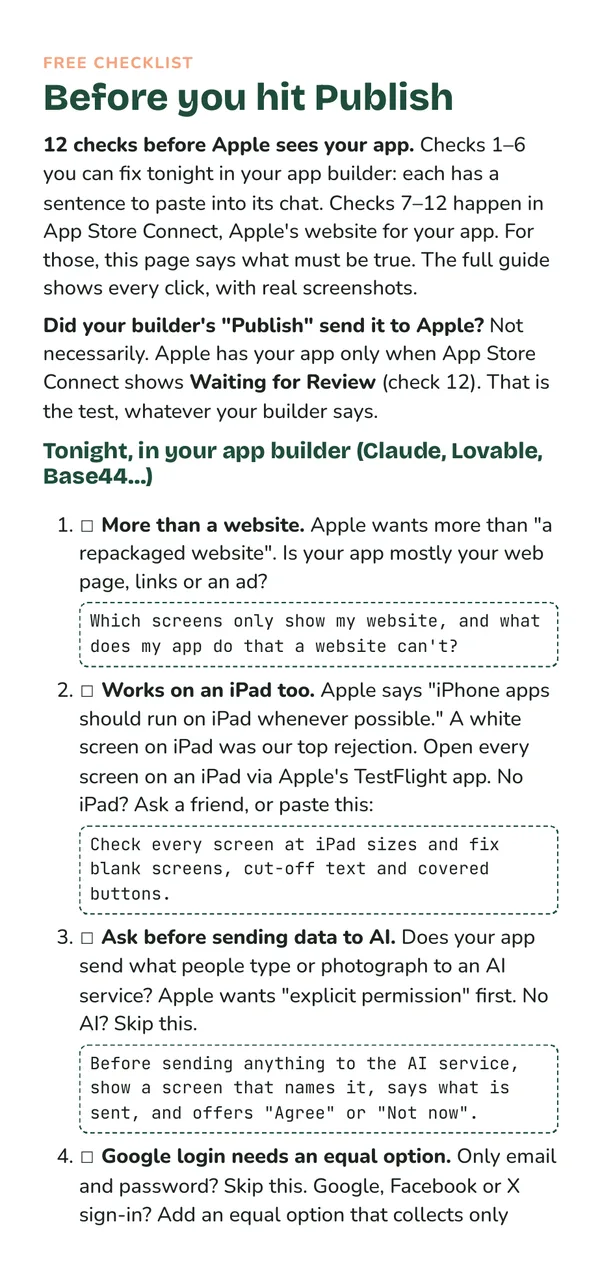
The first page of the free checklist Before you hit Publish.

Free · No email needed

Before you hit Publish:
12 checks for apps built with AI.

Checks 1–6 you can fix tonight in your app builder, each with a sentence to paste into its chat. Checks 7–12 say what must be true in App Store Connect before Apple reviews your app. Free to download and share.

Get the free checklist (PDF)

Already rejected? The first 10 minutes after Apple rejects your app (one page, free).

A note from us

We’re not Apple insiders.
We just got rejected a lot.

SubmitPreflight is made by a non-developer with a day job, who builds iPhone apps with AI after work.

That is exactly why the rejections hurt. Each message read as if it was written for someone who already knew the answer, and each wrong guess meant another review.

So this guide is written for the evening Apple’s message lands and you don’t know where to start: plain words, a short list of checks, the exact clicks and a reply you can adapt.

We left out what we couldn’t check. Where Apple doesn’t say how something works, the guide says so. App names and identifying details are withheld.

— The SubmitPreflight team

  • About 20of our own rejections, across 8 apps, February to September 2026
  • 297sourced facts; Apple’s rules and help pages read on 9 November 2026
  • 18fix pages, each in the same six steps
  • 15real App Store Connect screens, with names hidden

Published by Verto Studios, an independent studio that ships its own iPhone apps. Where we had a rejection, the fix page says what caused it for us and how often. Those counts tell you what to check first; they are not rates for everyone.

Instant PDF download

Before you decide

Fair questions.
Straight answers.

I’m not a developer. Can I use it?

Yes. It was written for people who built an app with an AI app builder such as Rork, Vibecode, Lovable, Claude Code or ChatGPT. The main steps need no code or terminal. When the fix is inside the app, the fix page gives you a prompt to paste into your builder. Developers will find the fix pages useful too.

My rejection isn’t one of the 18 fix pages. What then?

The fix pages cover the rejections we had, plus Apple rules that apply to features AI-built apps often have. They don’t cover every guideline. Chapter 2 says what to do when yours isn’t listed, including how to ask Apple one specific question instead of guessing and resubmitting.

Can’t I just ask ChatGPT?

On its own, a chatbot hasn’t seen our 20 or so rejections and what caused them, and it can’t see App Store Connect the way you do. So hand it the guide: the download includes an AI edition, the whole guide as one text file. Upload it to ChatGPT, Claude or Gemini with the prompt in Start here, and it works from our checks in a set order, the exact clicks as Apple’s help pages described them on 9 November 2026, and the reply templates.

Is it up to date?

Apple’s rules and help pages were checked on 9 November 2026. Chapter 5 follows Apple’s current flow for a first in-app purchase or subscription after the 15 July 2026 change, and the guide lists its sources. Apple changes things, so if a screen differs, Apple’s current help page wins. Updated files are yours on request for 12 months.

Will this get my app approved?

No guide can promise that. Apple alone decides, and a later review can find a different problem. The guide helps you understand Apple’s message, check the likely causes in a sensible order and answer clearly.

What do I get for $19?

After Rejection, a PDF guide of about 22,000 words, in a phone edition (197 pages with tappable links) and a desktop edition, plus a one-page checklist. The download also includes the edition-1 agent pack as a bonus.

How long does App Review take?

Apple’s stated goal is to review at least 50% of submissions in less than 24 hours and 90% in less than 48 hours. Chapter 1 lists what Apple says makes it longer, such as a first app with no review history or repeat rejections for the same guideline.

Does it access my app or App Store Connect?

No. It is a set of PDF files. It never signs in to or reads your App Store Connect account; you follow the steps yourself.

Is this a subscription?

No. $19 USD is a one-time purchase, with 12 months of updates. Your downloaded edition remains yours.

How do delivery and refunds work?

The phone and desktop PDF editions, the one-page checklist and the bonus agent pack download together after payment, from the confirmation page.

Request a full refund within 14 days of purchase by emailing your receipt number to hello@vertostudios.com.

What are the scope and limits?

Coverage: The rejections we had, plus Apple rules that apply to features AI-built apps often have. Apple’s rules and help pages were checked on 9 November 2026; if a screen differs, Apple’s current help page wins.

Bonus: The download’s Extras folder includes Bonus for developers: the edition-1 agent pack v0.3.2, for AI tools that can read a project folder. You don’t need it to use the guide. It was written for edition 1, and its purchase-submission steps predate Apple’s July 2026 change; chapter 5 of the guide replaces them.

Updates: 12 months of updates from delivery. Not lifetime. After 12 months your downloaded edition remains yours; later changes by Apple are not covered.

Support: Email, best-effort, file defects only. This is not a consulting retainer and does not include reviews of your app or submissions on your behalf.

It never signs in to or reads your App Store Connect account. You make the changes and test the final app.

It does not cover every guideline. Chapter 2 says what to do when your rejection is not listed.

It is not affiliated with Apple, and it does not predict what a reviewer will decide. It is not an app audit or submission service.

Read the full terms and scope

Ask us a question

Instant PDF download

You’re ready if…

  • You’d rather fix the real cause once than send the same build back and wait.
  • You want the exact App Store Connect clicks, not a tour of every menu.
  • You built your app with AI and want a prompt that asks your builder for the cause, not just a patch.
  • You want a reply to Apple that says which build fixes what.

Instant PDF download

P.S. Launch price $19 until 1 December, then $29. If Apple’s message is waiting in App Store Connect right now, you can have a plan in about 10 minutes.

After Rejection · $19 onceInstant PDF download

App Store Rejection Guide for AI-Built Apps — SubmitPreflight: After Rejection